PDF to LaTeX converter for editable academic documents
Convert PDF to LaTeX as a reviewable project rather than a block of copied text. This PDF2LaTeX workflow aims to reconstruct main.tex, document structure, equations, tables, and assets for Overleaf or a local editor.
How to check a converted equation
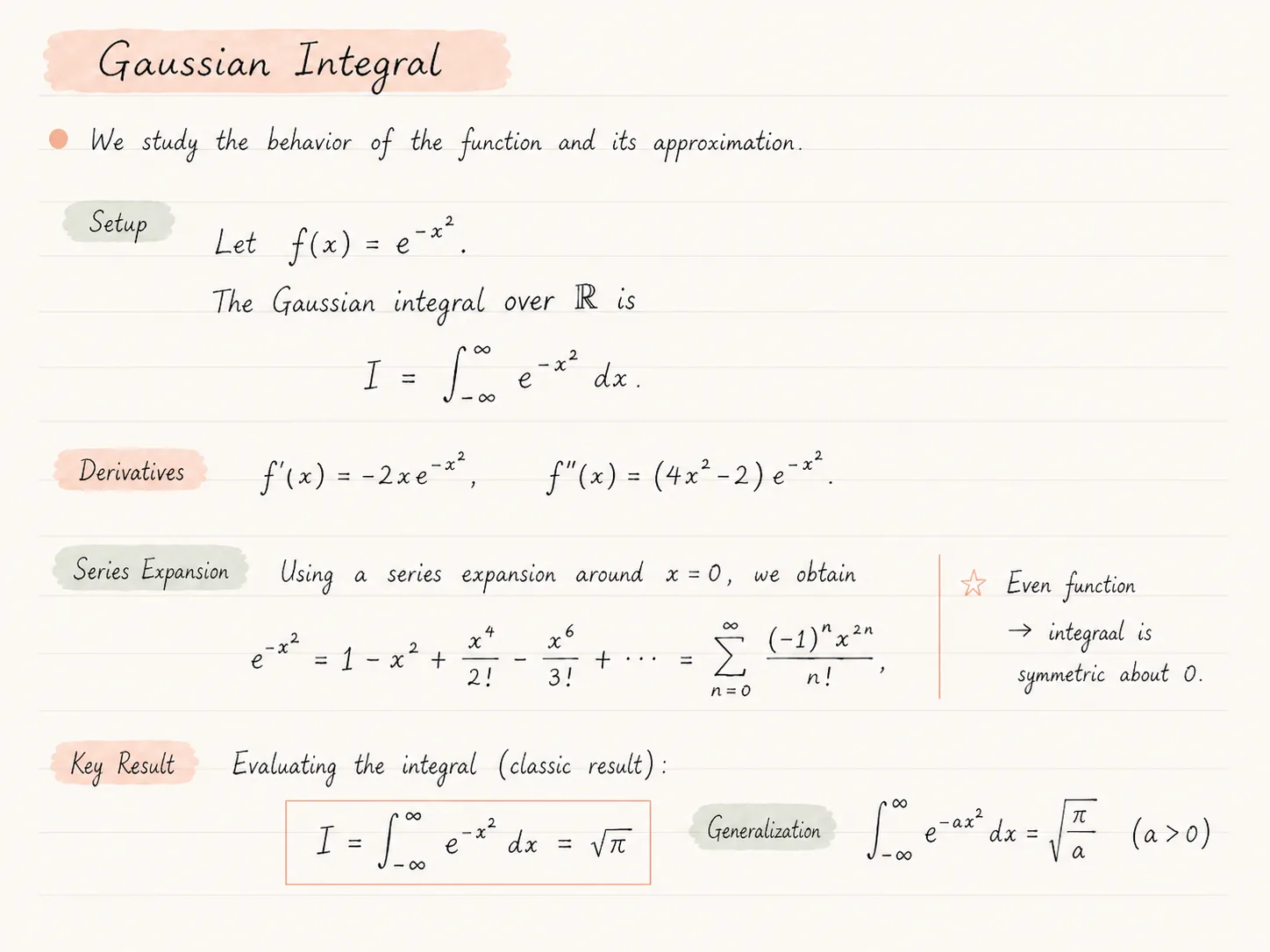
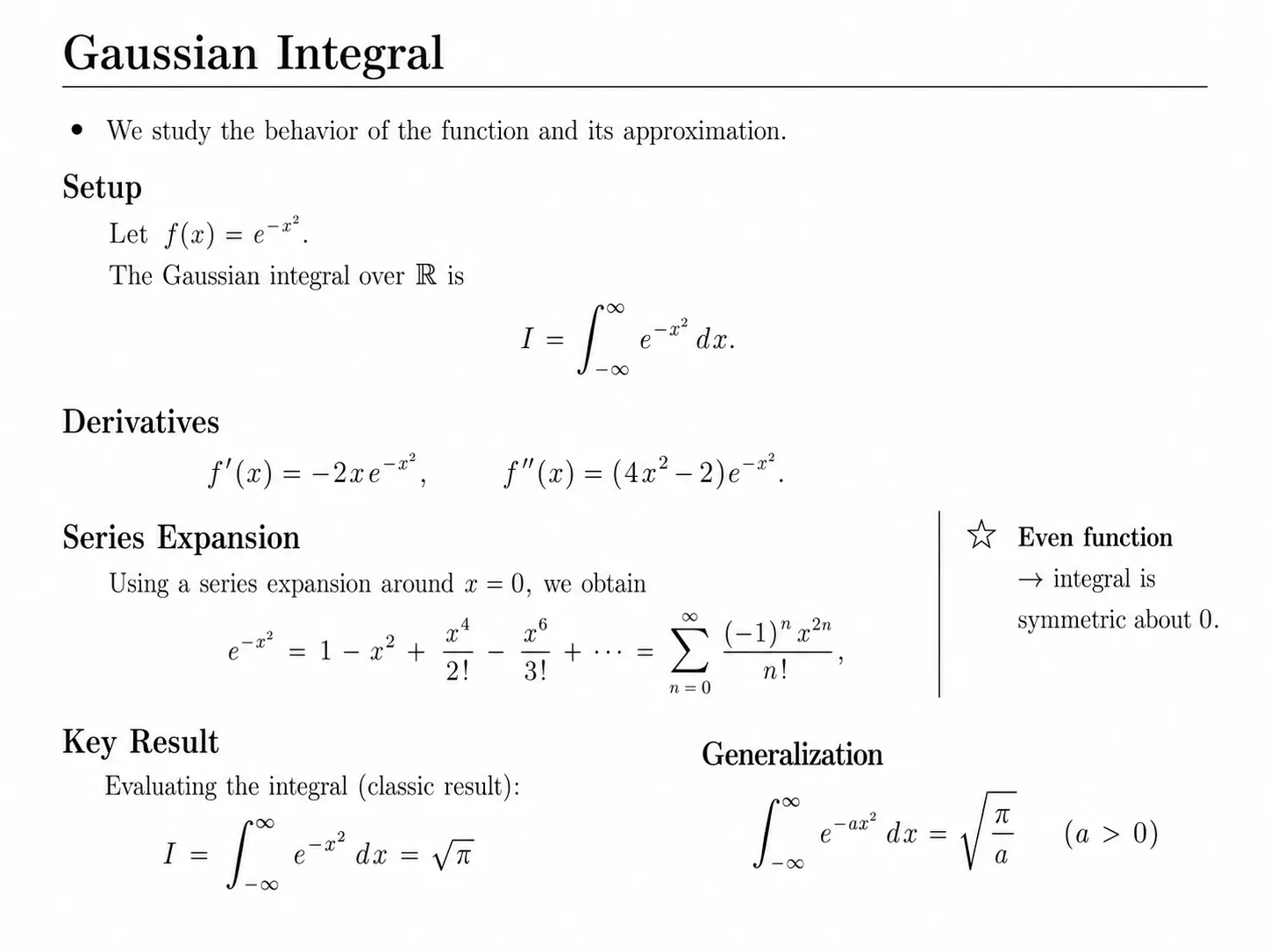
This illustrated Gaussian-integral note shows which details matter during review. The images are illustrative; the source below is a hand-written teaching example, not a measured conversion test.
LaTeX source for the central equation
\[
  I = \int_{-\infty}^{\infty} e^{-x^2}\,dx = \sqrt{\pi}
\]- Bounds: the lower limit needs a minus before infinity. Losing that sign changes the mathematical statement.
- Exponent: in e^{-x^2}, the minus belongs inside the exponent. A successful compile cannot detect a mathematically wrong exponent.
- Conditions: the generalization needs a > 0. Check assumptions and margin notes as carefully as the equation itself.
Continue with the derivatives and summation limits. A visually similar page still needs a mathematical content check.
What a PDF2LaTeX conversion gives you
The useful result is not just text with backslashes. document-to-latex is designed to return the files and evidence needed to continue real academic work.
Editable main.tex
A central LaTeX source file with a preamble and document structure that you can inspect, change, and version-control.
Compiled PDF preview
A render generated from the reconstructed source, so syntax and package problems become visible before export.
Page-by-page comparison
The original page and generated page are shown together to help you find missing content, layout drift, or notation errors.
Project ZIP and assets
An archive intended for Overleaf or a local LaTeX editor, including supporting files produced during reconstruction.
When a PDF to LaTeX converter is useful
A finished PDF is often the only version left after a paper, report, or lecture note has moved through several tools. The text may still be readable, but the editable structure is gone.
This page is for researchers, students, and technical teams who want to convert PDF to LaTeX or PDF to TeX as a workable project, including headings, math, tables, lists, and figures where possible.
The result is designed to be reviewed. Use the page-by-page comparison to check equations, table alignment, citations, and layout before submitting or sharing the document.
A five-minute review before you start editing
Check a few high-risk details first. If they look right, you can continue with the rest of the document more confidently.
- 1
Confirm that main.tex compiles and that the generated page count is plausible.
- 2
Compare equation symbols, numbering, and references with the original.
- 3
Inspect table columns, merged cells, captions, and long rows.
- 4
Check multi-column reading order, headings, figures, and page breaks.
- 5
Review citations and rebuild the bibliography manually if the original .bib file is unavailable.
A practical PDF to LaTeX workflow
- 01
Upload the PDF you want to rebuild.
- 02
Let the converter analyze pages, structure, equations, and table-like regions.
- 03
Review the compiled LaTeX output against the original PDF page by page.
- 04
Edit the generated source where needed and export the project ZIP.
- 05
Open the ZIP in Overleaf or continue locally in your preferred LaTeX editor.
What the converter is designed to preserve
Editable main.tex source instead of plain copied text.
A document outline that aims to keep headings and sections recognizable.
Math environments for equations where the source page is clear enough.
Table reconstruction that helps avoid manual retyping of every row.
An Overleaf-ready project archive with supporting assets.
Honest limitations
- Low-resolution scans, distorted pages, or unusual fonts can require manual correction.
- Dense tables, multi-column layouts, and custom macros may need cleanup after conversion.
- References and citations may be reconstructed as visible text rather than a complete BibTeX database.
- You should review before submitting, especially for math-heavy or high-stakes documents.
Common questions
Does the PDF become real LaTeX source?
The service aims to generate an editable LaTeX project with a main.tex file, compiled preview, and assets. Some parts may still need manual editing after review.
Is this only OCR?
No. OCR can be part of the process for scanned material, but the product is designed around reconstructing document structure, not just reading text.
Can I convert long academic PDFs?
Yes, within the page and plan limits shown on the pricing page. Longer documents benefit from careful review after conversion.
Will equations be editable?
The converter helps reconstruct equations as LaTeX when the source is readable. Complex notation and unclear scans may need corrections.
Can I use the output in Overleaf?
Yes. The export is packaged as a project ZIP intended for Overleaf and local LaTeX workflows.
Keep exploring
Continue with nearby converter pages, pricing, or the product overview.
Convert, compare, then edit
Upload a PDF, inspect the generated LaTeX render beside the original, and review before submitting or sharing the result.